Linguist guide
Your workspace is the Editor, where you translate, review, and confirm assigned work alongside the source. The tools available to you can vary by project.
- Assigned work: receiving jobs, opening assigned files, deadlines, and handing work back.
- Editing segments: editing, confirmation, shortcuts, sorting, filtering, comments, and tags.
- QA and LQA: running checks, navigating File Issues, dispositions, and verified fixes.
- Side panels and tools: TM/TB, research, concordance, preview, history, and spelling.
- Completing and exporting: readiness checks, read-only completion, and delivery formats.
Project permissions
If your PM has enabled a tool for the project, you can use it while working on an assigned file. Auto-translate, QA, LQA, termbase editing, spelling-dictionary editing, and protected-tag editing are controlled independently. A greyed-out action usually means that it is unavailable for this project.
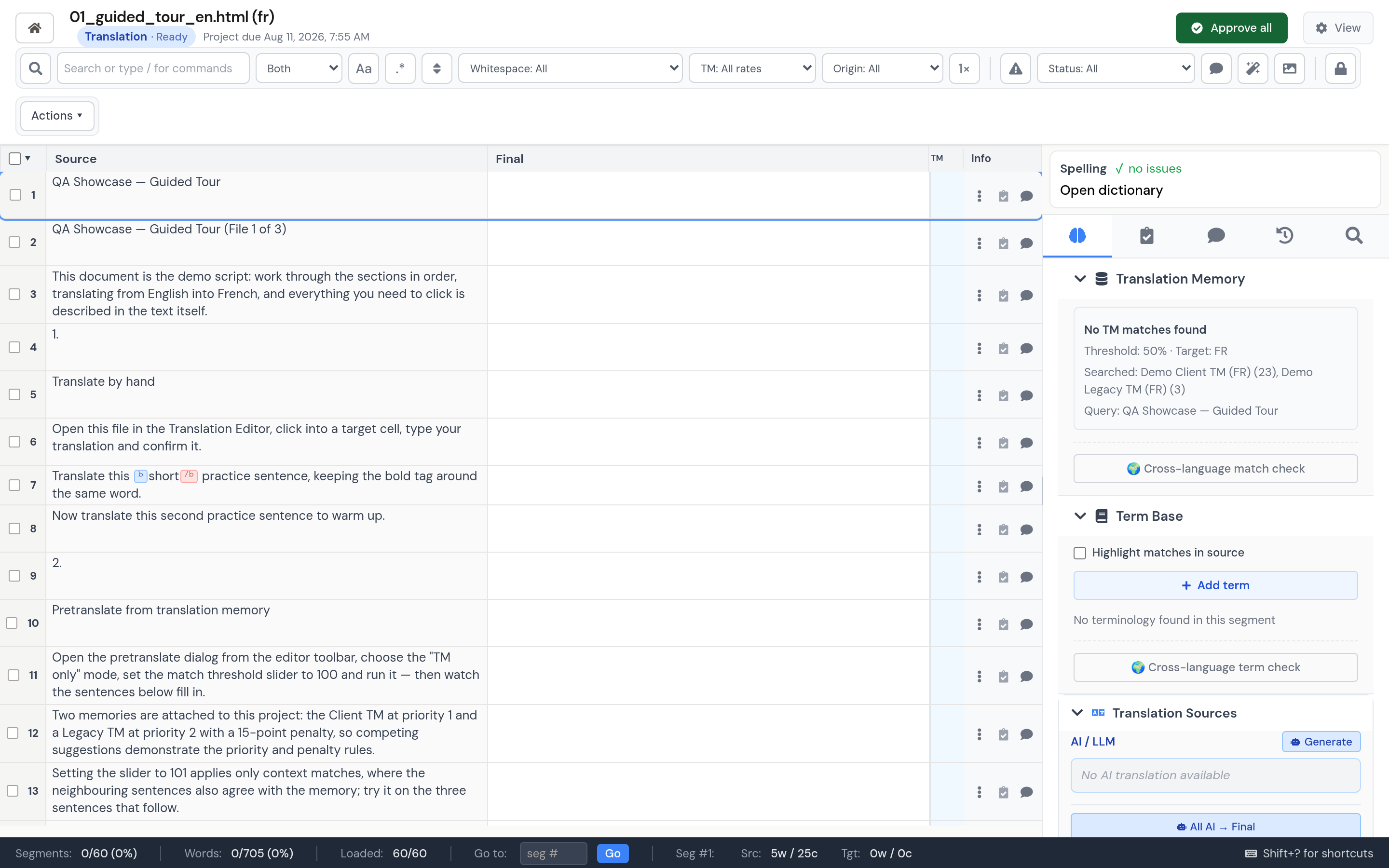
Editor layout
- Source column: the original text, read-only.
- Target column: the translation, editable until the session is complete.
- Status indicators: confirmation, locks, comments, QA/LQA findings, and translation provenance.
- Side panels: insights, comments and history, File Issues, research, concordance, spelling, and preview.
Segments load progressively as you scroll, so large jobs do not need to load every row at once. Search and most metadata filters work across the session, while safe regular-expression search is deliberately limited to loaded segments.