Completing and exporting your work
Completion and export are separate actions. You can export a working file when your access allows it, but Mark Complete is what confirms the active workflow stage and advances the file.
Marking work complete
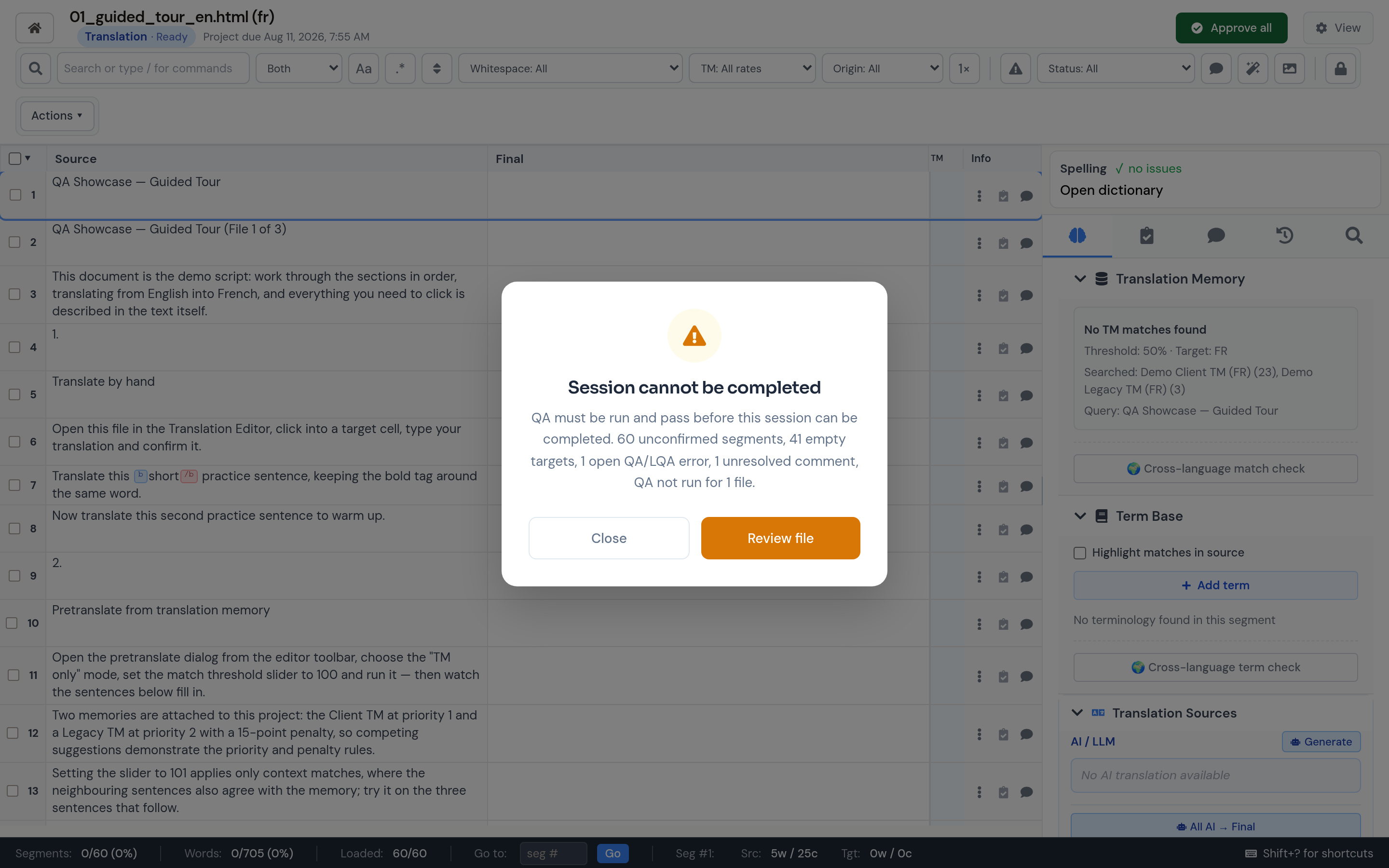
Choose Actions > Mark Complete when your pass is ready. For a joined session, LanguageOps checks every included file unless the action was started for one specific file.
The readiness check reports:
- Unconfirmed segments
- Empty targets
- Unresolved comments
- Open major or critical LQA findings
- A required QA run that has not completed
In Warn only mode, completion succeeds and reports the outstanding items. In Block until resolved mode, assigned users must resolve them before completing. A PM or workflow manager can override a blocking guardrail, and the override is recorded in project audit history.
Successful completion confirms the current workflow stage. The next stage becomes ready, or starts immediately and notifies its assignee when automatic advancement is enabled.
Completed sessions are read-only
Once complete, translation changes, confirmations, bulk edits, propagation, imports, and translation actions are disabled. Navigation, comments, QA/LQA review, history, and export remain available.
If another edit is required, choose Actions > Complete ✓ to mark the session incomplete. This explicit step prevents accidental changes after handoff.
Available exports
Choose Actions > Export in the editor.
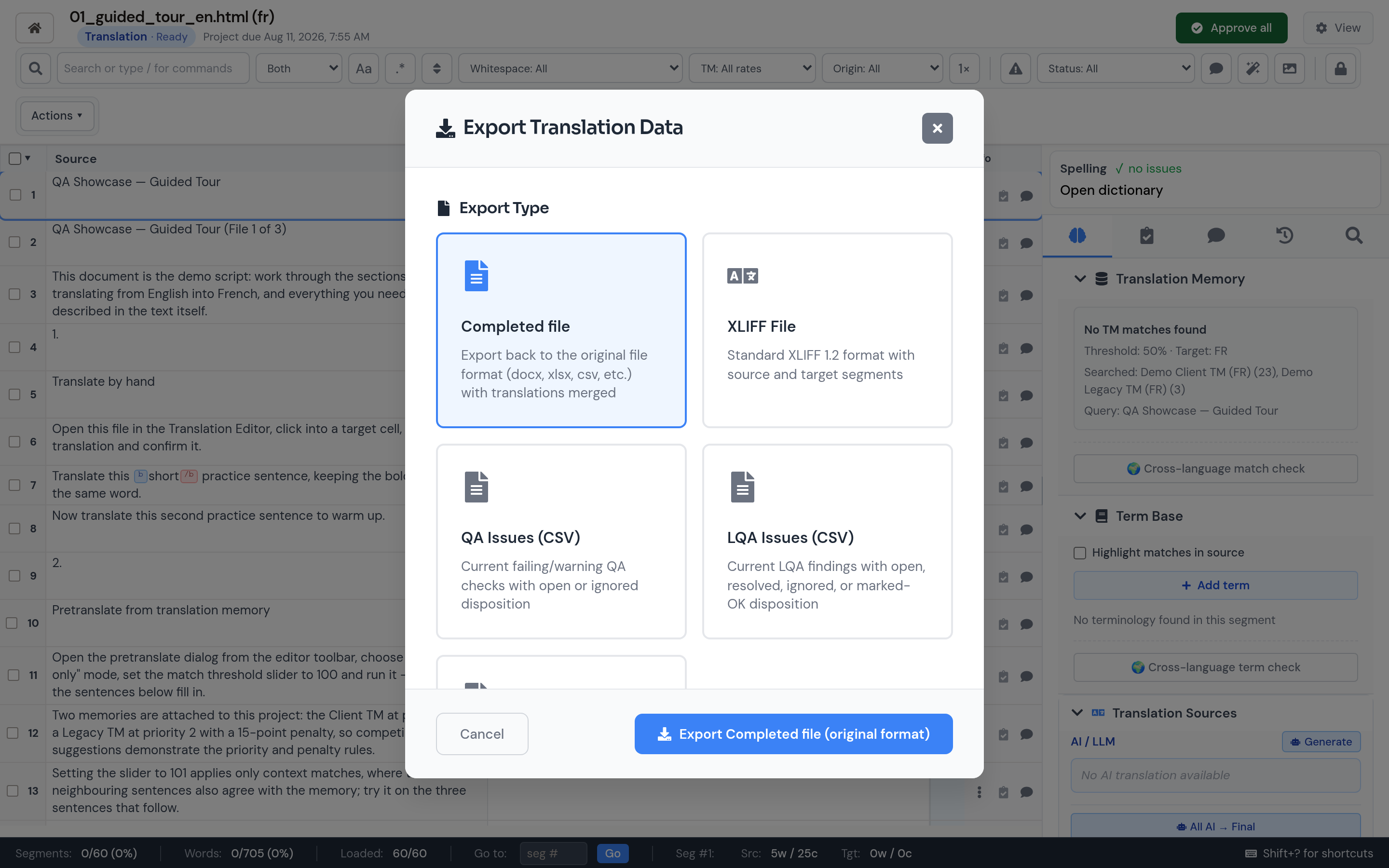
Completed File
Rebuilds the translated deliverable in its original format. Word remains Word, spreadsheets retain their workbook format, structured files retain their structure, and supported inline formatting is reconstructed from protected tags.
For retained SDL packages, LanguageOps rebuilds the original .sdlppx or .sdlrpx with translated target SDLXLIFF files when you can access every required bilingual. Older or partial imports fall back to standalone SDLXLIFF delivery.
XLIFF File
Exports XLIFF 1.2 for another translation tool or client TMS. Options include:
- Approved segments only
- Comments and notes as
<note>elements - Quality information as
<note>elements
In a joined editor session, select the file to export. Files are exported one at a time from this dialog.
QA Issues (CSV)
Exports current failing or warning QA checks in document order, including Open or Ignored disposition and whether each finding was addressed. A session with no current QA findings produces a header-only CSV.
LQA Issues (CSV)
Exports current LQA findings with category, severity, suggestion, resolution, Open/Resolved/Ignored/Marked OK disposition, addressed state, and disposition time.
Edit Distance (CSV)
Exports every session segment with its primary translation baseline, adaptive edit score, Jaccard distance, and Levenshtein distance. The file begins with the score definition so recipients can interpret the percentages correctly.
All issue and edit-distance exports cover the current single or joined session. Cells that could be interpreted as spreadsheet formulas are neutralised for safe opening.
Project-level exports
Project managers can select several translation files on the project page and export their XLIFF files as one ZIP. Partial package warnings are reported with the download rather than silently omitting failed files.
Connectors may also push completed translations back to the source TMS or CMS from the connector workflow.
Validation and export failures
The dialog validates its selected options before export. Original-format reconstruction also checks structural requirements such as protected tags and placeholders. If reconstruction fails, the error detail view identifies affected segments and available recovery options.
Completed File exports use the current target text, including unconfirmed drafts. If delivery requires every segment to be confirmed, filter to Status: Not approved and clear that queue before exporting.