Live Translate
Live Translate is for real-time interpreted meetings and events. Hosts schedule a session, invite guests with a shareable link, choose the allowed caption languages, and keep a post-event record for replay, transcript review, terminology corrections, and billing.
Scheduling a session
From Live Translate, choose Schedule session and set:
- Title, date/time, timezone, and duration.
- Source language or auto-detect.
- Languages attendees can choose from 70+ available languages.
- Who can speak: host only, or open floor.
- Optional password and invitee emails.
- Whether to record the session and whether to save the transcript.
- Retention period: until deleted manually, 30 days, 90 days, or 1 year.
- Optional pre-loaded terminology from a termbase.
Guests do not need a LanguageOps account. Copy the join link or invite them by email.
During the event
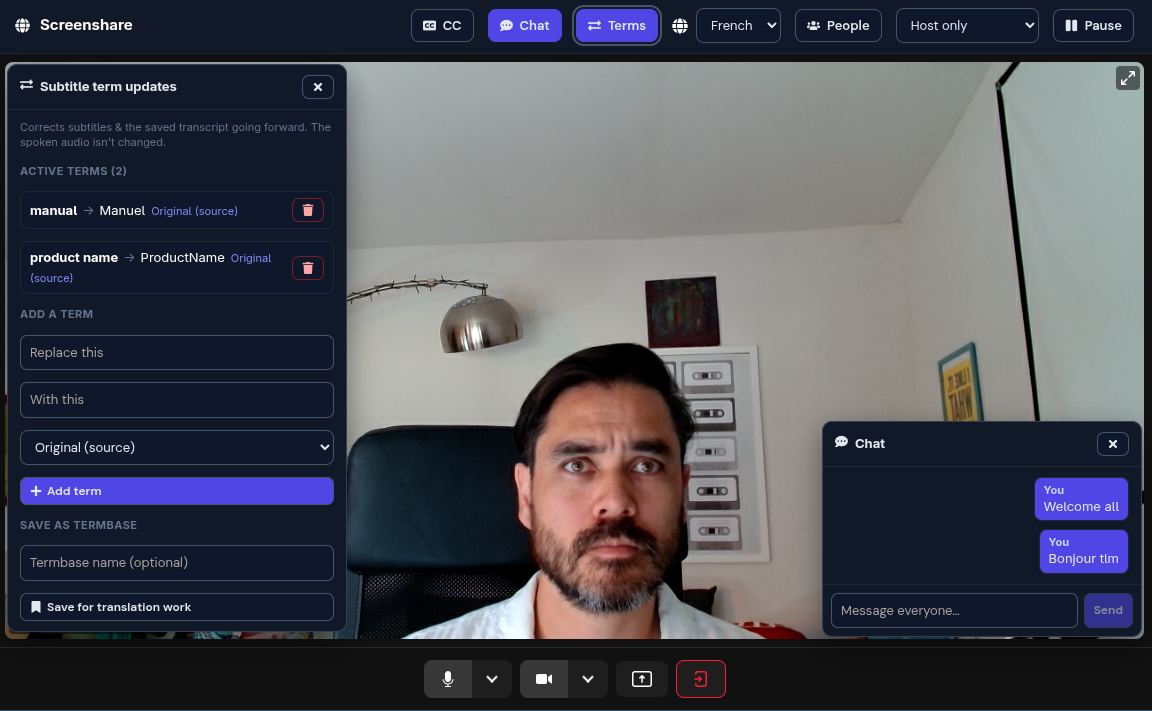
The host can share screen/camera, pause/resume, control who can speak, open chat, and switch attendee language views. The Terms panel lets the host correct subtitle terminology while the event is running. Corrections update subtitles and the saved transcript from that point forward; the spoken audio is not changed.
If the session has a termbase attached, matching entries are pre-loaded as approved subtitle corrections before the event starts.
Replay and transcript
After a session, hosts can open Replay to review the room recording with synced captions and transcript cues. You can switch between captured live languages, export the transcript as SRT or plain text, and request an additional playback language on demand from the saved source captions.
Event report
The post-event Report summarises:
- translated channel-hours, attendee count, attendee-minutes, recording minutes, and storage used
- per-language channel activity and billable hours
- approved, pending, and rejected terminology corrections
- transcript and recording status
- retention window and purge status
- host notes
Download the report as Markdown for client sharing or CSV for invoicing support. The monthly usage strip on the Past sessions tab reports translated channel-hours and attendee-minutes and can export a usage CSV.