Workflow stages and assignments
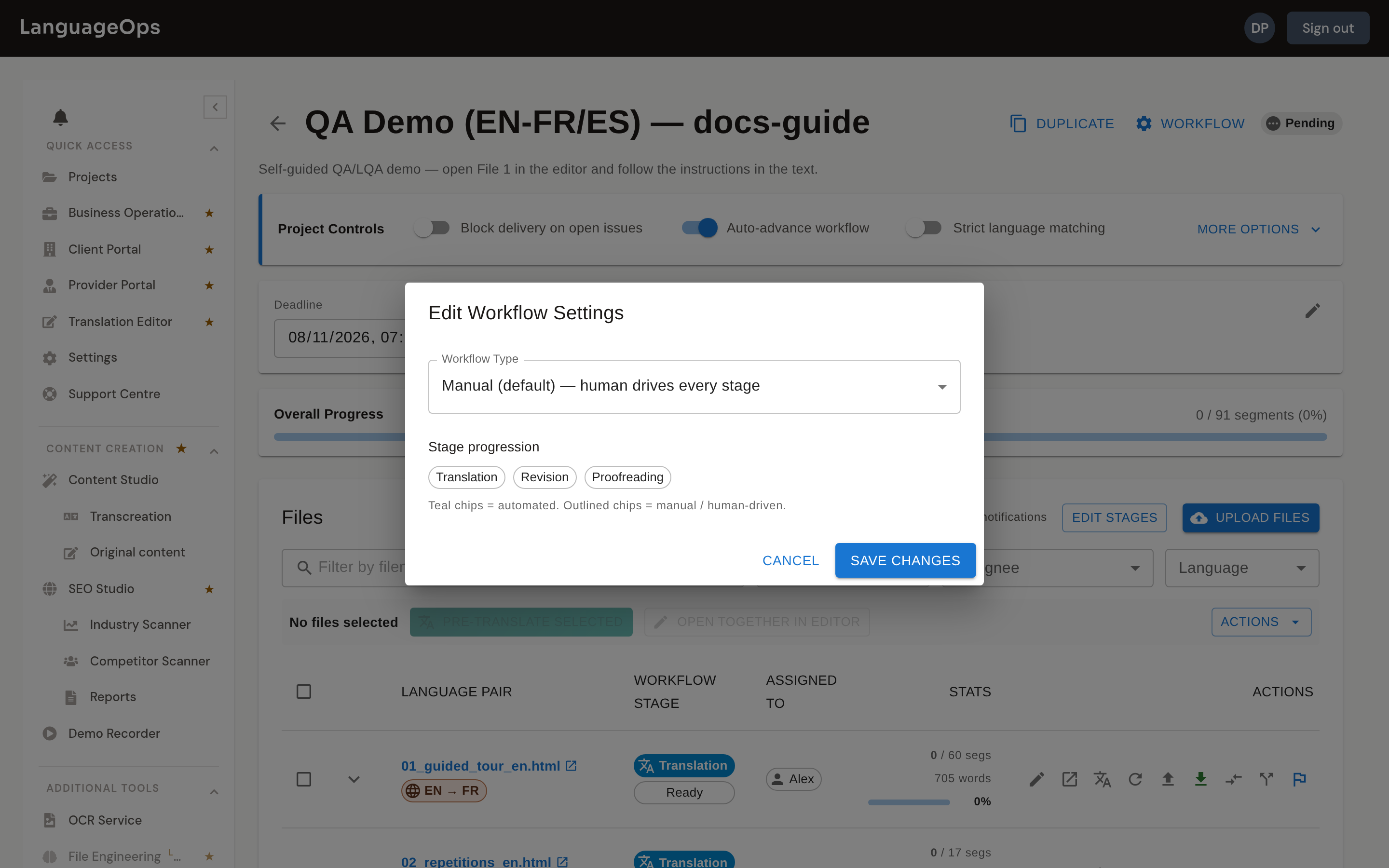
Every file moves through three stages:
Translation → Revision → Proofreading
Segments carry a matching status as they progress: Draft → Translated → Reviewed → Approved.
Automation level
The project's Workflow Type (set at creation, editable later under Workflow Settings) controls how much of the pipeline runs without a human:
| Workflow type | Translation | Revision | Proofreading |
|---|---|---|---|
| Manual (default) | Human | Human | Human |
| Auto Translation Only | Automatic | Human | Human |
| Automatic End-to-End | Automatic | Automatic | Human |
Proofreading is always manual. A human signs off before delivery.
Workflow settings
Under Workflow on the project page, control how stages progress:
- Stage assignments: assign Translation, Revision, and Proofreading independently.
- Stage deadlines: give each pass its own due date alongside the project deadline.
- Auto-advance workflow: start the next configured stage after confirmation instead of waiting for a manual PM action.
- Workflow notifications: notify the next assignee when work reaches their stage.
- Stage TM behavior: control when confirmed content is written to translation memory.
Assigning work
Each stage of each file can be assigned to a team member or left open to Anyone. Per-file assignments let you distribute a large project among linguists, and stage assignments let a translator hand off to a separate reviser and proofreader.
Restricted users see and can open only files assigned to them at the current stage. An assigned linguist can combine compatible same-language files into a joined editor session, but every selected file is checked against their active assignment.
Use privacy-safe names in assignment views. Email addresses are used for delivery but are not exposed as project labels.
Linguist permissions
The project page's Project Controls > More options section independently controls what assigned linguists can use:
- Auto-translate: editor translation actions and AI research
- QA: deterministic QA runs
- LQA: linguistic assessment runs
- Add/edit terms: terms in readable, attached termbases
- Add/edit dictionary: the project spelling dictionary
- Edit inline tags: validated raw protected-tag markup
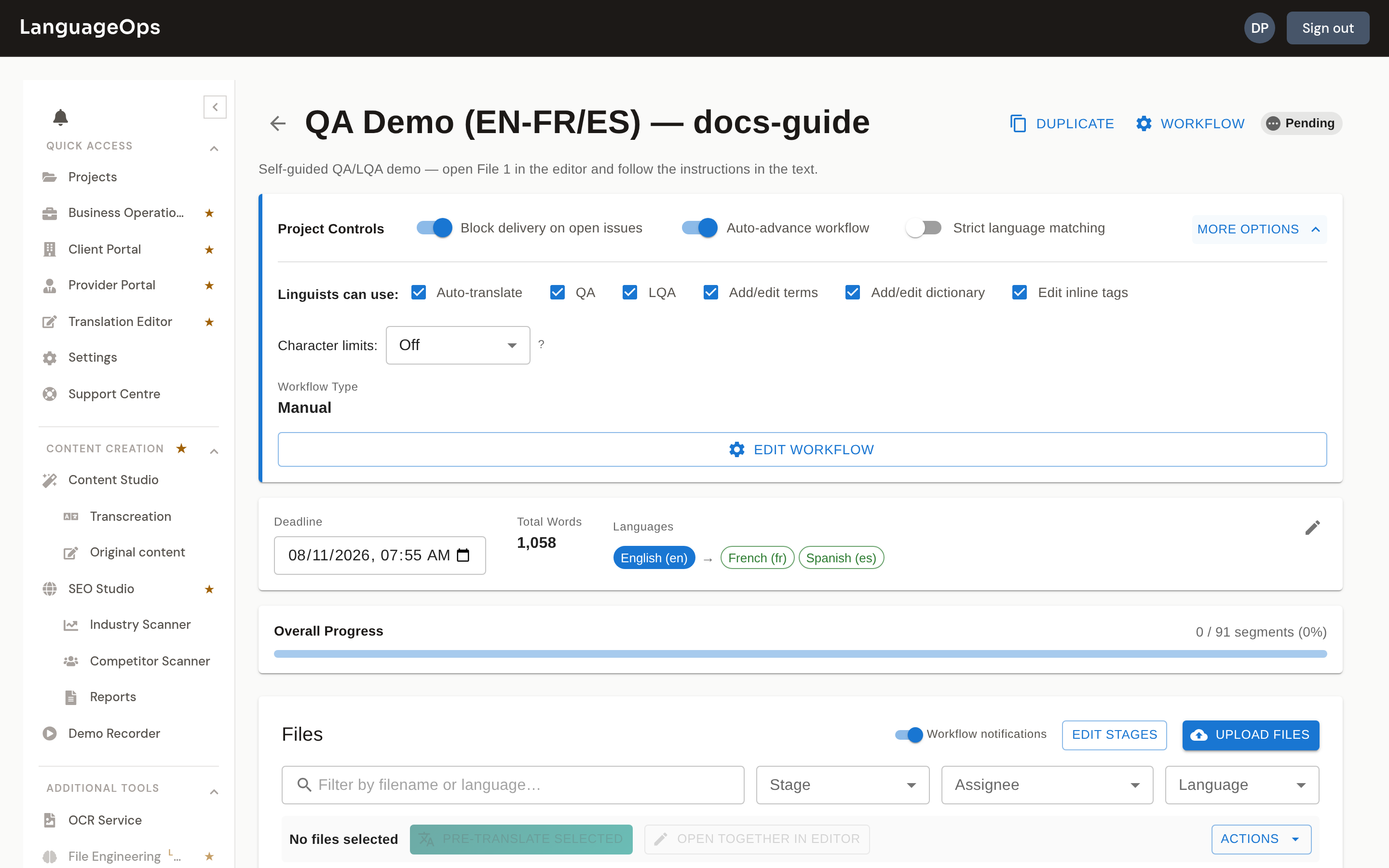
New projects default to QA enabled for linguists, while auto-translate, LQA, termbase editing, dictionary editing, and inline-tag editing require an explicit decision. Existing projects retain their saved values. PMs, admins, owners, and other workflow managers keep management access regardless of these linguist controls.
Document these decisions in the project brief so assignees understand whether a greyed-out action is intentional.
Delivery guardrails
Block delivery on open issues switches the project between Warn only and Block until resolved behavior.
Completion evaluates the active file or all files in a joined session for:
- Unconfirmed segments
- Empty targets
- Unresolved comments
- Open major or critical LQA findings
- A required QA run when QA blocks delivery is enabled
Warn mode completes the stage and reports outstanding counts. Block mode prevents a non-manager from completing until the work is ready. Managers can override, and every override is written to the audit history.
Completed editor sessions are immutable until explicitly unmarked. This prevents edits, imports, translations, or bulk operations from changing content after handoff.
Tracking progress
The project page shows each file's stage, status, assignee, language pair, and progress. The Audit History records assignments, transitions, completion, and guardrail overrides.
When a linguist chooses Mark Complete, LanguageOps performs the readiness check, confirms the matching workflow stage, and advances the file. With auto-advance enabled, the next stage starts and can notify its assignee. Otherwise the next stage becomes ready or waits for assignment. Segment history, file workflow, and project audit history remain aligned.